Features
Not every booth needs a locked-down timeline. Most need to react fast, play the right sound at the right moment, chain cues cleanly, and stay in control when things go live. Theater, dance, improv, young audiences, solo shows, events, background music: in the real world, cueing is more often live than scripted. BlackBox Cue was built for that reality. A modern audio cueing tool: immediate, precise, and accessible: designed for live response, not for complexity.
Hardware Feel
Designed to look and feel like a real hardware soundboard. No confusing menus, no deep settings.
300 Pads, 25 Pages
All your sounds at your fingertips. 300 pads organized across 25 pages, each with its own playback settings. Load WAV, MP3, OGG, FLAC, AAC/M4A, AIFF, WMA, Opus and more, and trigger them instantly.
Crossfade
Smooth equal-power crossfade transitions between tracks. Adjustable from 1 to 10 seconds, or set to AUTO: the software analyzes each track, matches the crossfade duration to the actual fade-out, aligns transitions to musical bars, and syncs tempo between similar tracks.
Auto-Trim
Automatically detects and skips silence at the start and end of each track. Your cues start right on the sound.
Fade-In / Fade-Out
Smooth volume ramps from 0 to 10 seconds per track. Professional transitions every time.
Volume Normalization
Automatically balances all tracks to a consistent volume, even from different sources.
Waveform Display
See exactly where your audio starts, ends, and where the trim points are set.
SFX Pads
Two dedicated sound effect pads that play independently from the main playback.
Keyboard Shortcuts
F1-F12 for pads, Space for stop, Page Up/Down for navigation. Fast and reliable.
Wireless Presenter
Control playback hands-free with a standard wireless presenter. No sound engineer needed.
MIDI, OSC & Audio Control
Connect any MIDI controller to trigger pads and switch pages. Send timed MIDI, OSC, or audio cues during playback to control lighting consoles, DMX interfaces, or any stage equipment. Use text-to-speech cues as audio reminders or to replace a paper cue sheet.
Next Cue Indicator
When a one-shot track ends or is stopped, the next pad blinks automatically. Always know which cue comes next, on screen and on Stream Deck.
Audio Output Selection
Double-click MASTER OUT to choose your audio output device. Route sound to a specific sound card or audio interface. Switch between stereo and mono output with a double-click.
Listen Preview
In Edit Mode, hear a preview of any track on a separate audio output before going live. Cue your next sound in your headphones while the audience hears the show.
4-Band Parametric EQ
Each pad has its own 4-band parametric equalizer with multiple filter modes, real-time frequency response display, and live spectrogram during preview. A master EQ with the same controls applies to the entire output, letting you adapt to any venue. Fine-tune your sound like on a professional mixing console.
Audio Effects
Apply reverb, delay, flanger, lo-fi, robot, distortion, or vocal remover effects to any pad. Each effect offers ready-to-use presets with a simple wet/dry control. Preview effects in real time before going live.
Speed Control
Adjust playback speed from 50% to 120% without changing the pitch. Slow down music for dance rehearsals, speed it up for practice sessions. Change tempo in real time during preview.
Built-in Automation
Program volume changes, fade and crossfade settings, mode switches, pad triggers, SFX playback, and text-to-speech announcements: all timed to the music. Each pad becomes a small automation script that runs hands-free during the show.
Who is it for?
BlackBox Cue adapts to your needs, from live shows to background music.
Stage Managers
Adjust music directly during rehearsal. No prep time needed: assign a file, configure the behavior, and play. Build your entire cue list on the fly.
Improvisation Shows
Nothing is scripted in improv theater. The sound operator reacts in real time with 300 sounds at their fingertips, triggering music and effects on the spot.
Solo Performers
One-man shows, magicians, storytellers: control your soundtrack hands-free with a wireless presenter or a Stream Deck, without needing a sound engineer.
Dance Schools
Start, stop, and switch music instantly with crossfade. Slow down any track for choreography practice without changing the pitch, then play at full speed for the show. Auto-Trim starts your cues right on the beat.
Theater Companies
Build an efficient cue list in minutes, not hours. Each pad has its own end behavior, start offset, and fade settings. Perfect for workshops and touring productions.
Young Audience Shows
Timing depends on the audience's reactions. Trigger any sound at any moment, in any order. Two SFX pads let you layer effects over the main playback.
Music Teachers
Assign a full piece to one pad, then load the same track on other pads with different start offsets. Jump instantly to any passage to explain, demonstrate, or rehearse it in detail with your students.
Blind Test Organizers
Load up to 300 song excerpts on your pads and trigger them one by one. Auto-Trim starts right on the music, and custom offsets let you skip intros to jump straight to the chorus.
Dance Competition Organizers
Assign each page to a dance style: 12 tracks for salsa, 12 for hip-hop, 12 for contemporary, and so on. Switch pages instantly to move between categories during the event.
Background Music
Waiting rooms, shops, restaurants, exhibitions: set up a playlist with crossfade and volume normalization, and let it run all day long.
Why use a dedicated audio player?
A standard media player is fine for listening at home. On stage, you need tools built for live performance.
| Feature | Standard player | BlackBox Cue |
|---|---|---|
| Instant access to 300 sounds | ||
| Auto-Trim (skip silence at the start and end of tracks) | ||
| Automatic fade-in and fade-out | ||
| Equal-power crossfade with AUTO mode (bar-aligned, tempo-synced) | ||
| Per-track end behavior (one-shot, loop, continue) | ||
| Elapsed and remaining time displayed simultaneously | ||
| Volume normalization across all tracks | ||
| Dark stage-ready interface | ||
| SFX pads (play effects over main track) | ||
| MIDI, OSC & audio control cues | ||
| Wireless presenter and Stream Deck support | ||
| Keyboard shortcuts for every pad | ||
| Next cue indicator | ||
| Audio output device selection | ||
| Listen preview on separate output | ||
| Instant mono/stereo switch | ||
| Per-pad & master parametric EQ with spectrogram | ||
| Per-pad audio effects (reverb, delay, flanger, lo-fi, vocal remover...) |
BlackBox Cue is free. It brings together quick setup, smooth transitions, and precise control in a tool designed for experienced stage managers and beginners alike. No timeline to program, no hours of preparation. Receive your tracks during rehearsal, assign them to pads, and you're ready to go.
See it in action
A dark interface with the look and feel of a hardware soundboard. Every control is visible at a glance - no menus to dig through.
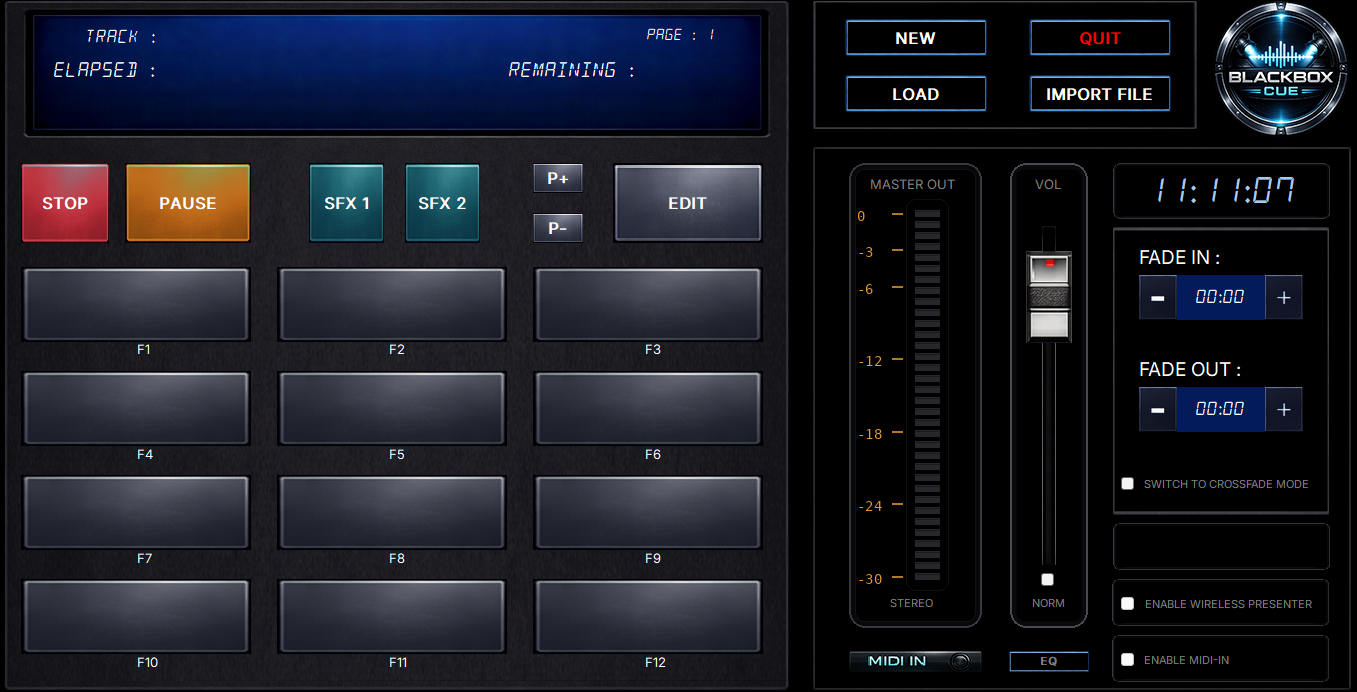
Main interface: 300 pads, playback controls, volume fader
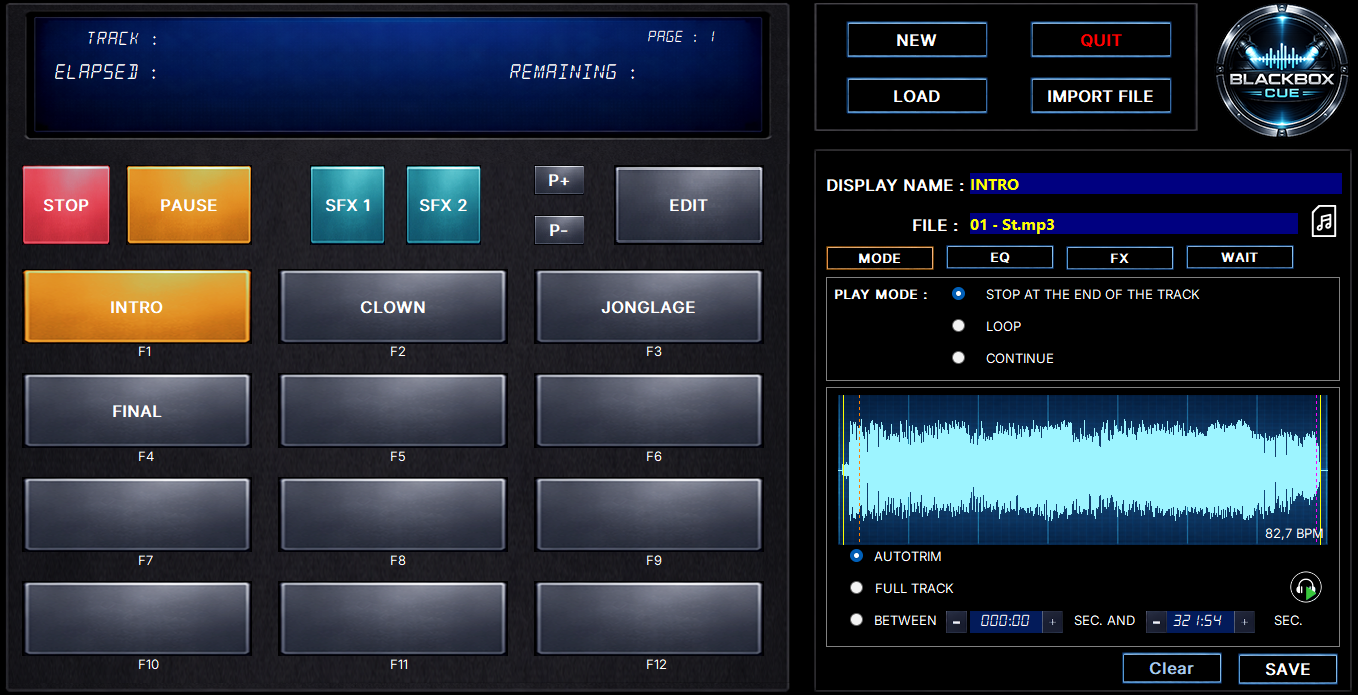
Edit mode: waveform display, Auto-Trim, BPM detection, pad settings
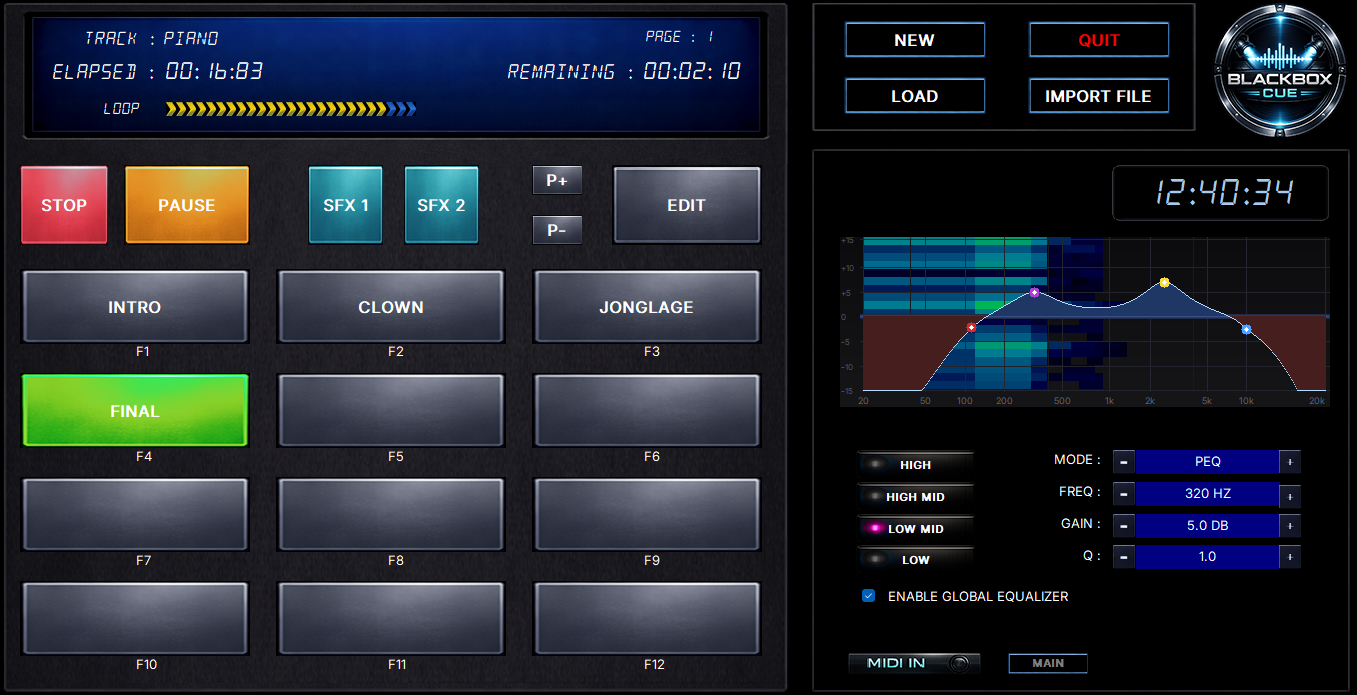
4-band parametric EQ with real-time spectrogram during playback
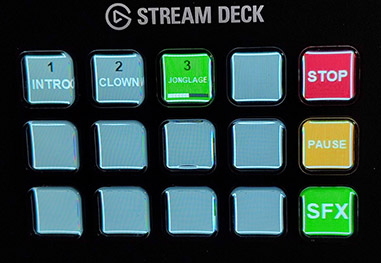
Stream Deck Integration
Use an Elgato Stream Deck (15-key model) as a physical control surface. BlackBox Cue automatically detects your device and maps your pads to the keys.
- 12 pad keys with caption and progress bar
- Dedicated Stop, Pause, and SFX buttons
- SFX mode and Page navigation mode
- Automatic detection - plug and play
Up and running in under a minute
Set up a background music playlist for a waiting room, restaurant, or exhibition:
Create a new project
Switch to crossfade mode
Click Auto-Assign and select your music folder
Enable volume normalization
Set your desired volume level
Set crossfade to about 5 seconds, or choose AUTO
Click the first pad - done!
Download BlackBox Cue
Free - No registration, no ads, no limits.